
Launching Allegro X AI
Allegro X AI is accessible directly in your OrCAD X or Allegro X PCB design environment, streamlining the process of incorporating AI into your PCB flow. Allegro X AI can be launched directly from the menu by selecting Tools > X AI. This will launch an X AI panel which can be moved around the PCB canvas or docked as desired.
Logging into Allegro X AI
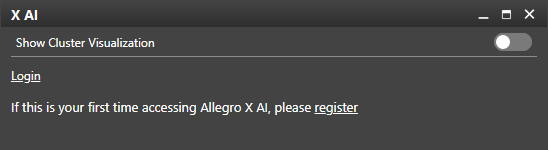
In the X AI panel, select Login to log in with your Cadence username and password. You will be prompted to verify your email address.
If this is your first time using Allegro X AI or you do not have a Cadence username and password, select Register.
Uploading a Design to Allegro X AI
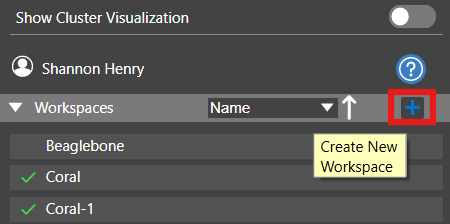
To upload a design to Allegro X AI, a workspace must be created. Select the plus sign to create a new workspace, provide a name for the workspace, and click Enter.
Note: When naming the workspace, no spaces are allowed in the name.
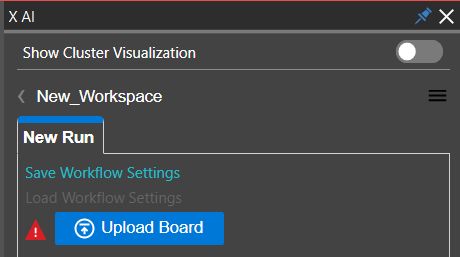
Once the workspace is created, select Upload Board. This will upload the board that is currently opened in OrCAD X or Allegro X to Allegro X AI.
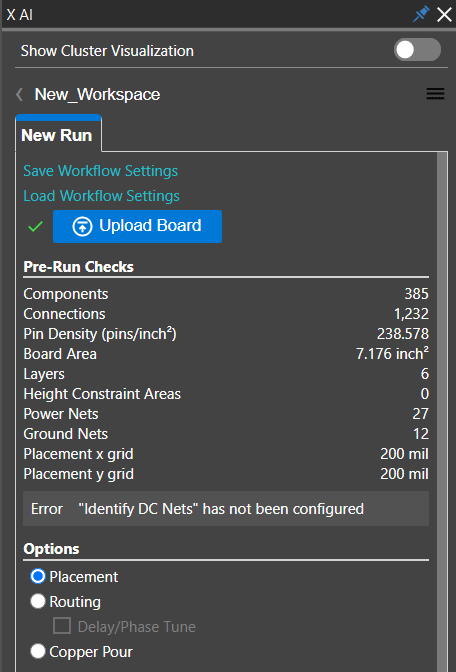
When the board is uploaded, Pre-Run Checks will be automatically performed. This section will report a summary of the design as well as any errors or warnings that should be addressed before running Allegro X AI.
With the board uploaded you can now select the desired Allegro X AI engine to configure and perform component placement, pours, or routing.
Additional Help for Allegro X AI
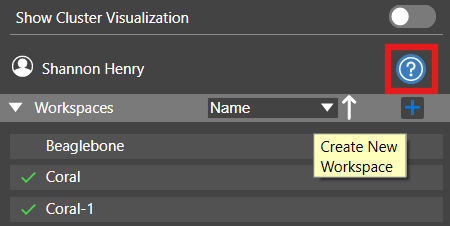
For additional information and help using Allegro X AI, select the question mark in the workspaces panel to launch help documentation and the Allegro X AI User Guide.
