Modern electronic design pushes power density limits higher every year. Engineers pack more functionality into increasingly tiny printed circuit boards (PCBs). However, high power output inevitably generates excess heat. Managing such excess heat prevents premature device failure. Accordingly, software platforms can be used to ensure design teams predict thermal behavior accurately. However, finding the exact right tool requires a best thermal simulation software comparison.
In past decades, hardware teams built physical prototypes to test thermal conditions. Engineers attached physical thermocouples to copper traces and measured heat dissipation in a laboratory. Such an approach wastes time and money. Instead, software simulation often replaces physical testing, allowing engineers to identify hotspots, evaluate thermal gradients, and adjust component placement before manufacturing begins.
Buyer’s Guide: Evaluating Analysis Tools
Before analyzing specific platforms, engineers must understand the underlying software known as physics solvers. Evaluating software tools doesn’t require a doctorate in mathematics, but it does require a basic grasp of computational fluid dynamics (CFD) and finite element analysis (FEA).
FEA vs. CFD: The Core Differences
FEA divides solid materials into a discrete mathematical grid. The FEA solver calculates heat conduction through solid structures, such as a copper plane or a silicon die. Think of FEA as mapping a traffic jam block by block across a city map. FEA works exceptionally well for pinpointing precise temperature spikes inside the actual printed circuit board structure.
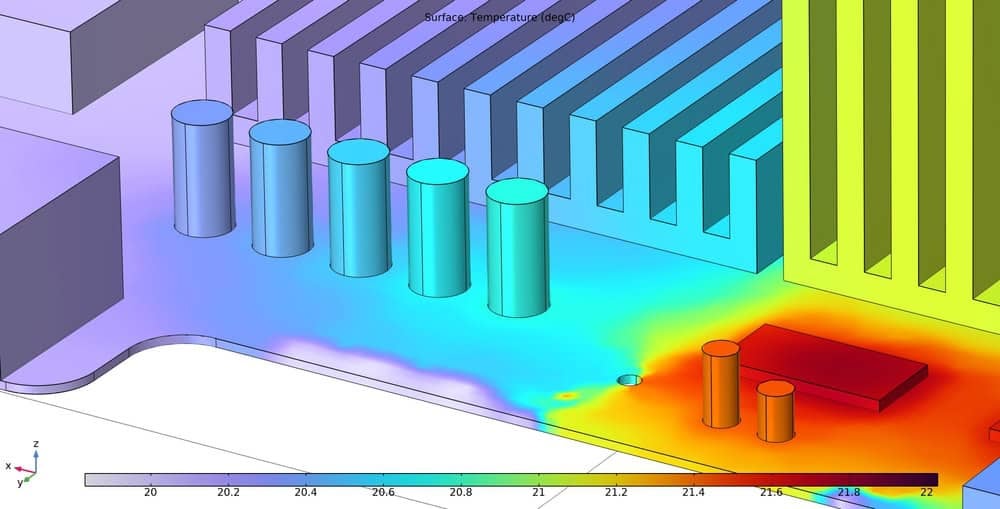
CFD models the movement of fluids. CFD calculates convective heat transfer from airflows or liquid cooling systems. Think of CFD as predicting weather patterns inside the device chassis. If an engineer needs to evaluate case fan placement, airflow trajectories, or heatsink fin geometry, CFD provides the necessary flow data.
Engineers also need to consider meshing capabilities. Meshing acts like throwing a geometric net over a 3D model. A tighter net captures more details but takes massive computational power to solve; some software platforms force users to draw the net manually. Alternative platforms generate the mesh automatically, which saves hours of setup time.
Best Thermal Simulation Software Comparison for 2026
Comparison of Thermal Simulation Software Tools
| Software | Primary Solving Method | Accuracy Profile | Target Audience | Specific ECAD Integrations |
| Cadence Celsius Studio | FEA & CFD Co-simulation | Ultra-High (Co-Sim) | Enterprise PCB designers | Allegro, OrCAD, AWR, Sigrity, ODB++, IPC-2581, Mentor, Altium, DXF, Zuken, PADS, and more. |
| Ansys Icepak | CFD | High (System/Fluid) | Advanced thermal engineers | Ansys Electronics Desktop, ODB++, IDF, IPC-2581 |
| Siemens Simcenter Flotherm | CFD | High (Electronics) | System-level electronics engineers | Xpedition, PADS |
| SimScale | CFD & FEA (Cloud) | Moderate to High | Cloud-first hardware teams | SOLIDWORKS, Autodesk, Native CAD (STEP/IGES) |
| COMSOL Multiphysics | FEA | Ultra-High (Multiphysics) | Researchers & analysts | ODB++, IPC-2581 (via ECAD Module) |
| 6SigmaET | CFD | High (Cooling specific) | Dedicated cooling engineers | ODB++, IDF, IDX |
| Altair PollEx | Analytical / 2D/3D Thermal | Moderate (Board level) | PCB verification engineers | Altium, Allegro, PADS, ODB++ |
| Dassault SOLIDWORKS Flow Simulation | CFD | Moderate to High | Mechanical engineers | SOLIDWORKS Electrical |
Cadence Celsius Studio
Cadence has engineered Celsius Studio to combine FEA and CFD solvers natively. Such an approach allows engineering teams to simulate both solid structure heat conduction and ambient fluid convection simultaneously. Furthermore, co-simulation capabilities, for those using Cadence design software, eliminate the need to pass files back and forth between different physics engines.
- Pros: True electro-thermal co-simulation capabilities. The software integrates heavily with OrCAD and Allegro workflows.
- Cons: High learning curve for entry-level designers.
- Target Audience: Enterprise engineering teams requiring heavy IC-to-package-to-board co-simulation.
- Integrations: Allegro, OrCAD, AWR, Sigrity, ODB++, IPC-2581, Mentor, Altium, DXF, Zuken, PADS, and more.
Ansys Icepak
Ansys Icepak uses a dedicated CFD solver tailored strictly for electronics thermal management. Icepak models airflow and temperature fields across the entire system enclosures. Engineers often rely on Icepak to evaluate complex turbulent flow around large heatsinks.
- Pros: Accurate fluid modeling. Icepak integrates deeply into the Ansys ecosystem.
- Cons: Expensive licensing tiers. Running complex fluid dynamics requires substantial local computing hardware.
- Target Audience: Thermal engineers building complex hardware enclosures.
- Integrations: Ansys Electronics Desktop (AEDT), ODB++, IDF, IPC-2581.
Siemens Simcenter Flotherm
Simcenter Flotherm focuses heavily on rapid thermal prototyping. The program uses SmartParts technology to quickly build component models. SmartParts allow engineers to drop pre-configured fans, heatsinks, and integrated circuits directly into the workspace.
- Pros: Fast solving times. The large library of pre-built component models reduces setup friction.
- Cons: The user interface feels dated compared to newer alternatives.
- Target Audience: System-level thermal specialists.
- Integrations: Xpedition, PADS.
SimScale
SimScale operates entirely in the cloud. Cloud deployment reduces the need for expensive local hardware arrays. Users run heavy simulations via a standard web browser. When engineers execute a simulation, SimScale borrows computing power from remote servers.
- Pros: Highly accessible platform. The collaborative environment helps remote teams share data easily.
- Cons: Requires a persistent high-speed internet connection. Importing native ECAD files often requires generic step file conversions.
- Target Audience: Mid-market hardware startups and distributed engineering teams.
- Integrations: SOLIDWORKS, Autodesk, generic CAD formats.
COMSOL Multiphysics
COMSOL Multiphysics excels at coupled phenomena. Sometimes heat interacts with structural mechanics or electromagnetics. High temperatures cause physical copper expansion. Beyond damaging logic circuits, heat can physically bend the board. COMSOL evaluates multiple physics domains simultaneously to see how heat warps physical structures.
- Pros: Unmatched multiphysics modeling capabilities. Users can write highly customizable equations directly into the solver.
- Cons: Very complex setup phase. Running COMSOL requires deep underlying physics knowledge.
- Target Audience: Research and development scientists.
- Integrations: ODB++, IPC-2581 via the ECAD Import Module.
6SigmaET
6SigmaET strictly targets electronics cooling. General-purpose CFD tools often struggle to map highly detailed geometries of printed circuit boards. 6SigmaET automates gridding and meshing specifically for electronics. The software recognizes small components and adjusts the mathematical grid automatically.
- Pros: Intelligent automation reduces manual mesh setup time. 6SigmaET delivers exceptionally high accuracy for heatsinks and forced-air enclosures.
- Cons: A niche focus limits general mechanical engineering use cases.
- Target Audience: Dedicated thermal engineers focused solely on electronics cooling.
- Integrations: IDF, IDX, ODB++.
Altair PollEx
Altair PollEx operates primarily as a printed circuit board verification platform. Engineers use PollEx to run quick thermal checks during the early layout phases. The software uses analytical and empirical calculations to map temperature distributions across the bare board. Such a method evaluates trace heating and component placement rapidly without executing a heavy, mathematically dense solving of fluid dynamics.
- Pros: Extremely fast processing times. Early verification prevents costly design iterations later in the manufacturing cycle.
- Cons: The platform lacks deep system-level fluid dynamic capabilities for evaluating external case airflow.
- Target Audience: PCB layout engineers checking electrical and thermal rule violations.
- Integrations: Altium, Allegro, PADS, ODB++.
Dassault SOLIDWORKS Flow Simulation
Dassault builds SOLIDWORKS Flow Simulation directly into the mechanical computer-aided design environment. Mechanical engineers do not need to export geometry to an external solver. The electronic cooling module evaluates airflow, Joule heating, and thermal contacts simultaneously within the native 3D workspace. Such a setup promotes concurrent engineering, meaning the physical enclosure and the cooling strategy evolve together.
- Pros: Highly intuitive interface for mechanical designers. Working inside the native CAD environment reduces file translation errors.
- Cons: Complex bare-die or microscopic package-level calculations fall outside its primary capabilities.
- Target Audience: Mechanical engineers building physical enclosures and system-level thermal dissipation hardware.
- Integrations: SOLIDWORKS Electrical, native SOLIDWORKS files.
Finding the Right Fit for the Engineering Team
Overheating components trigger sporadic logic errors, unexpected system reboots, and permanent hardware failure. Selecting an appropriate analysis platform heavily influences physical product survival.
Engineering managers must match software capabilities to the specific skills of their internal team. A purely electrical design group frequently struggles to operate a heavy, mechanical-focused CFD tool. Conversely, mechanical teams evaluating chassis airflow find PCB-focused FEA programs overly restrictive. Evaluate internal engineering workflows thoroughly before committing to a specific physics engine.
To ensure design teams maintain high standards, engineers should review the complete best thermal simulation software comparison. EMA Design Automation provides expert guidance and training resources. Contact EMA Design Automation to evaluate analysis tools tailored for your specific engineering workflow.
EMA Design Automation is a leading provider of the resources that engineers rely on to accelerate innovation. We provide solutions that include PCB design and analysis packages, custom integration software, engineering expertise, and a comprehensive academy of learning and training materials, which enable you to create more efficiently.
For more information on the best thermal simulation software comparison and how we can help you or your team innovate faster, contact us.